Why the Copilot Agent Is Slower on the Local Mac
Copilot agent in VS Code: local Mac (Cairo) vs. a remote machine in Canada · Measured 26 Oct 2026, 15:45 (UTC+3)
Bottom line: the screenshots are not the problem. The slowdown comes from a long chat history full of images, which is re-sent on every message, and from high network latency (169–400 ms) on the local connection. The remote machine in Canada sits in a data centre near the API and probably ran a short, fresh chat.
Test environment
| Date and time | 26 Oct 2026, 15:45 (Cairo, UTC+3) |
| Location | Cairo, Egypt |
| ISP | Telecom Egypt (WE), AS8452 |
| Public IP | 41.41.212.x |
| Machine | MacBook Pro, Intel i7-9750H, 16 GB RAM, macOS 26 |
| Remote machine for comparison | Canada (not measured) |
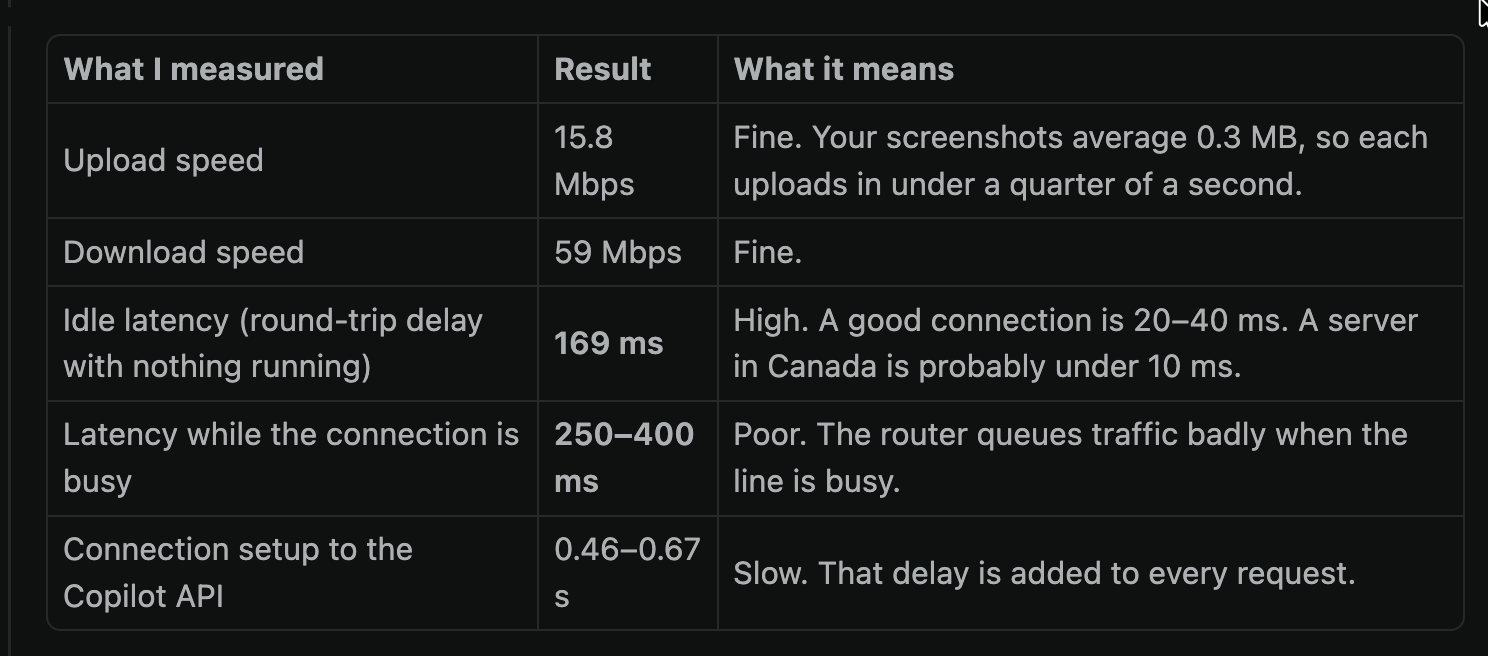
Network measurements (local Mac)
| What was measured | Result | What it means |
|---|---|---|
| Upload speed | 15.8 Mbps | FineScreenshots average 0.3 MB, so each uploads in under a quarter of a second. |
| Download speed | 59 Mbps | Fine |
| Idle latency (round-trip delay with nothing running) | 169 ms | HighA good connection is 20–40 ms. A server in Canada is probably under 10 ms. |
| Latency while the connection is busy | 250–400 ms | PoorThe router queues traffic badly when the line is busy. |
| Connection setup to the Copilot API | 0.46–0.67 s | SlowThat delay is added to every request. |
Repeat run with the test script (16:45)
| What was measured | 15:45 (first run) | 16:45 (script run) |
|---|---|---|
| Download | 59 Mbps | 50–61 Mbps |
| Upload | 15.8 Mbps | 6–13 Mbps |
| Idle latency | 169 ms | 101 ms |
| Latency while uploading | 246 ms | 1.3 s |
| Copilot API connection setup | 0.46–0.67 s (single try) | 0.28–0.32 s (median of 5) |
The connection changes from minute to minute. The biggest problem is latency while uploading: when something is sending data, such as a pasted screenshot or Dropbox syncing, every request can wait more than a second.
Why the remote machine in Canada was faster
- Chat length matters most. Every message re-sends the whole conversation to the model, including earlier screenshots. A long chat with many images takes noticeably longer to process. The remote session was probably fresh and short.
- Network delay. A data-centre server is right next to the API. Local round trips of 169–400 ms add delay to every request and every tool call. An agent task with many tool calls pays that delay many times over.
- Local machine load. VS Code's high CPU use on an older Intel Mac (i7-9750H, 16 GB) slows down how quickly the app handles and displays responses.
How to make it faster
- Start a new chat for each task, such as fixing the question bank UI. This has the biggest effect.
- Paste only the cropped part of the screen you need, not full-screen screenshots.
- Use Ethernet or sit closer to the router, and pause large downloads, uploads and cloud syncing (Dropbox, iCloud) while working.
- Close unused VS Code windows and extensions to lower CPU load.
Run this test on another machine
Follow these steps on the remote machine. The results will line up with the ones above.
Step 1: Run the network test script
It reports the date and time, public IP (last part hidden), ISP, download and upload speed, latency, and the time to connect to the Copilot API. It takes about a minute.
| Machine | Command (paste into a terminal) |
|---|---|
| macOS / Linux | curl -s https://speed.instaconsult.me/speed-test.sh | bash |
| Windows (PowerShell) | irm https://speed.instaconsult.me/speed-test.ps1 | iex |
View the scripts before running them: speed-test.sh · speed-test.ps1
Step 2: Time Copilot's responses
- Open a new chat in VS Code. Use the same model on both machines.
- Text test: send
Reply with only the word OK. - Image test: download the standard test image (0.16 MB), attach it, and send
Describe this image in 3 short bullet points. - For each test, time it from pressing Enter to (a) the first words appearing and (b) the full answer.
- Repeat each test 3 times, starting a new chat each time, and compare the averages.
Step 3 (optional): Let Copilot run it all
Paste this prompt into a new Copilot agent chat on the remote machine:
Run a Copilot speed diagnosis on this machine.
1. Run the network test:
   - macOS/Linux: curl -s https://speed.instaconsult.me/speed-test.sh | bash
   - Windows PowerShell: irm https://speed.instaconsult.me/speed-test.ps1 | iex
2. Show the results as a table with columns "What was measured", "Result", "What it means":
   date/time with timezone, location, ISP, public IP (last part hidden), download, upload,
   latency, and connection setup time to api.githubcopilot.com and api.individual.githubcopilot.com.
3. Compare them with this baseline from Cairo (Telecom Egypt, 26 Oct 2026):
   download 50-60 Mbps, upload 6-16 Mbps, idle latency 100-169 ms,
   latency under load 250 ms - 1.3 s, Copilot API connection 0.28-0.67 s.
4. Explain which differences would make Copilot respond faster or slower.
Method
- Network speed and latency: macOS
networkQuality -s, plus the test script (Cloudflare speed endpoints) for the 16:45 run. - API connection timing:
curltoapi.githubcopilot.comandapi.individual.githubcopilot.com, including TCP and TLS setup. - Image size: average of the 16 screenshots pasted into the chat session.
- ISP and IP:
ipinfo.io. The last part of the IP is hidden because this page is public. - The remote machine in Canada was not measured. Its figures are estimates based on typical data-centre conditions.